Introducing the Android Market website

Over the past two years, developers around the world have helped make Android Market the go-to place for more than 100,000 apps, games and widgets. Previously, you could only access Android Market directly from your device, but today, we are introducing the Android Market website that lets you browse and search for great apps right from your web browser.


The website makes it easy to discover great new apps with a bigger, brighter interface. You can also send apps directly to your Android device with just a few clicks—no wires needed. We’ve built in new social features, too. You can share apps with your friends through Twitter. And you can read and post app reviews directly to Android Market from the web or from your device.

And what about all those apps you’ve already purchased and downloaded? Sign in to the website with your Google account and click “My Market Account” to see all the apps you’ve purchased or downloaded. It makes managing all your apps quite easy.

The Android Market website was officially unveiled today during an event at Google headquarters where we showcased Honeycomb (Android 3.0), our latest Android release built from the ground up for tablets. Honeycomb has a completely redesigned user interface, with more interactive notifications and widgets, improved multi-tasking, and the latest and greatest Google Mobile services optimized for tablets. We also showed off pre-release applications optimized for Honeycomb, from over 17 developers including:

  • AccuWeather
  • CNN
  • Disney Mobile
  • The Economist
  • Fuze box
  • Glu Mobile
  • Google Body
  • Grocery iQ
  • Intuit
  • Ngmoco
  • Pulse News
  • Quickoffice
  • Time Magazine
  • TouchType
  • Trendy Entertainment
  • War Drum Studios
  • Weatherbug
  • Zynga

Stay tuned for more at Mobile World Congress (February 14) in Barcelona where you'll see more than 50 developers demoing their latest phone and tablet apps at the Android booth in Hall 8.


Announcing Google Shopper for iPhone

(Cross-posted on the Google Merchant Blog)

As we announced last November, millions of people have downloaded Google Shopper for Android to help them shop on the go. Today, we’re excited to let you know that Google Shopper, our popular Android shopping application, is now available for iPhone as a download in the App Store. Google Shopper turns your iPhone into a shopping assistant, so you can:

  • Learn more about products and read relevant user reviews
  • Compare prices at online and local stores
  • Save and share products for later consideration

Let’s say you’re planning a special meal for Valentine’s Day - but you need a cast-iron skillet to get the recipe just right. With Shopper, finding one is easy enough: just type in “cast iron skillet” or say it using Voice Search. Then, from the results, you can choose a specific product that appeals to you. Alternatively, if you were in the store and wanted to see product reviews, you could also scan the barcode of a particular product.


Once you’ve selected a product result, you can compare prices across web retailers, and even find where you can purchase the item nearby, which is especially useful for those of us who are last-minute shoppers. For some retailers, we also provide inventory information so you can see if a particular store branch has the item in stock, has limited availability, or if the item is out of stock and you should head to a different store.


If you’re not sure about making a purchase or are building out a gift list, you can “star” products for future consideration. You can also share items with friends across your social network to let them know about products you love or great deals you've found.

You can download Google Shopper for free in the App Store. Shopper is available for iPhone 3GS and iPhone 4 with iOS 4.0+ in English only for the United States and the UK.

We hope you enjoy shopping with Google Shopper!

Check in with Google Latitude

(Cross-posted with the Official Google Blog)

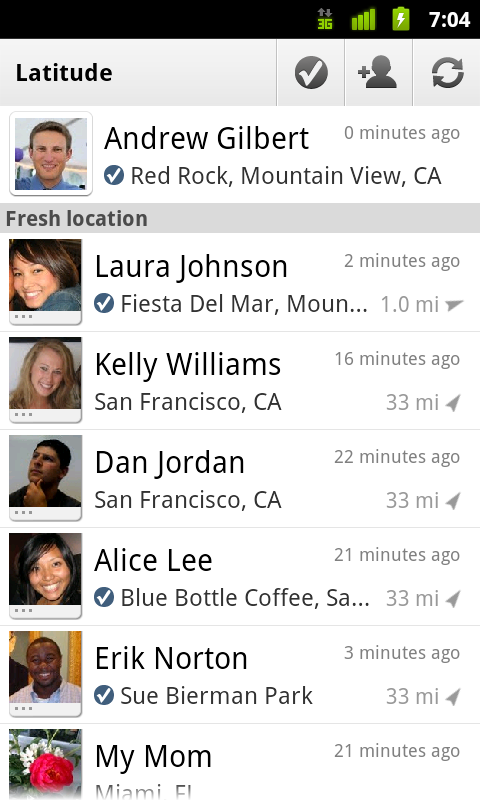
We first introduced Google Latitude to help you stay in touch with your friends and family by making it easy to share where you are. For the 10 million people actively using Latitude each month, this “where” has been a location on a map. Starting today in Google Maps 5.1 for Android, you can also connect that location to a real place by checking in there using Latitude.

Connecting your location with places
You can still use Latitude to automatically update and share your location, but check-ins let you add context to the location—like captions to a photo. For example, I live in San Francisco but often travel around the world. Until today, sharing my location let friends and family know if I was across the globe or in their neighborhood. Now, check-ins let them see the cool restaurant I’m trying in Taipei or join me for a latte at the cafe nearby.

See where your friends are on a map and where they’re checking in.

Not your typical check-ins
Because you can use Latitude to automatically detect your location, we’ve added a few twists to checking in to make it really easy:
  • Notifications: Turn on check-in notifications in Latitude’s settings and get a notification to check in at a nearby place once you arrive. Never forget to check in again.
  • Automatic check-ins: Choose to automatically check in at specific places you designate, and you’ll be checked in when you’re there. You can talk to friends or finish your bagel without fumbling with your phone.
  • Check out: Once you leave, Latitude knows to automatically check you out of places so friends aren’t left guessing if you’re still there.


Explore your world one check-in at a time
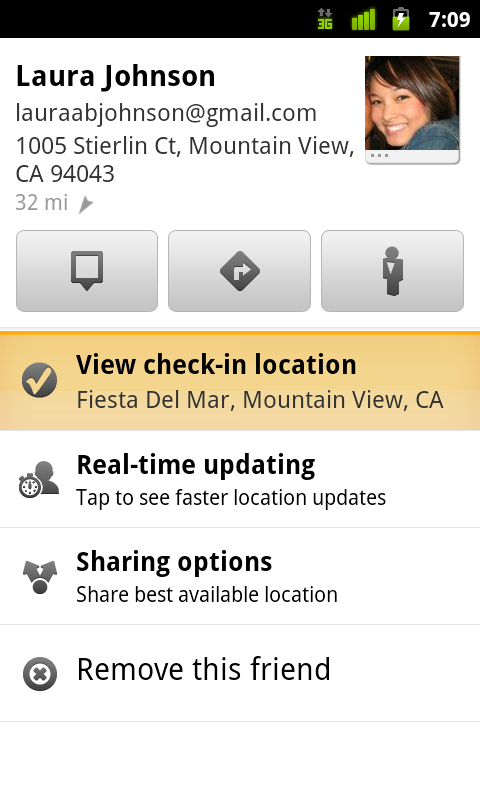
Latitude is built right into Google Maps for Android so check-ins work across Latitude and Maps seamlessly. For example, check in at that new hamburger joint, and you’ll see its Place page with reviews to help you order. When friends check in at a place, you can go straight from their Latitude profile to its Place page to learn about it, fire up Google Maps Navigation (Beta) for turn-by-turn directions to them, and more.

You can also check in at a favorite place to earn special status there; you’ll see if you’ve become a “Regular,” a “VIP” or a “Guru” on its Place page. Keep checking in to hold onto your status or reach the next level.

Latitude check-ins are built right into Google Maps and Place pages.

Of course, we thought carefully about how to make checking in to places quick and easy while giving you control over your privacy. Just like when sharing your location with Latitude, checking in is 100% opt-in, and you can choose to share any check-in with your friends on Latitude, publicly on the web and your Google profile, or just yourself. Learn more about checking in and managing your check-ins with Latitude in the Help Center. Coming later this week, you’ll also be able to see your complete history of check-ins using the optional History tab at google.com/latitude from your computer.

Update (2/11/2011): You can now see check-ins and your own check-in history at google.com/latitude from your computer.

Choose options for individual check-ins or turn on and off notifications in the Latitude settings.

Start checking in by downloading the latest Google Maps from Android Market (on Android 1.6+; tap here if you're on your phone) and then joining Latitude from the main menu. You can check in everywhere Maps and Latitude are already available. If you’re using the new Latitude app for iPhone, you’ll see your friends’ check-ins, and we’ll update the app soon so you can check in too.

Just the beginning...
Checking in from Latitude is just one step in helping you connect the places you go with the people you care about. We believe in letting you use or share your location however you like, and we’re working on making location and check-ins useful in more places—across Google and the web.

Android 3.0 Platform Preview and Updated SDK Tools

Android 3.0 (Honeycomb) is a new version of the Android platform that is designed from the ground up for devices with larger screen sizes, particularly tablets. It introduces a new “holographic” UI theme and an interaction model that builds on the things people love about Android — multitasking, notifications, widgets, and others — and adds many new features as well.

Besides the user-facing features it offers, Android 3.0 is also specifically designed to give developers the tools and capabilities they need to create great applications for tablets and similar devices, together with the flexibility to adapt existing apps to the new UI while maintaining compatibility with earlier platform versions and other form-factors.

Today, we are releasing a preview of the Android 3.0 SDK, with non-final APIs and system image, to allow developers to start testing their existing applications on the tablet form-factor and begin getting familiar with the new UI patterns, APIs, and capabilties that will be available in Android 3.0.

Here are some of the highlights:

UI framework for creating great apps for larger screen devices: Developers can use a new UI components, new themes, richer widgets and notifications, drag and drop, and other new features to create rich and engaging apps for users on larger screen devices.

High-performance 2D and 3D graphics: A new property-based animation framework lets developers add great visual effects to their apps. A built-in GL renderer lets developers request hardware-acceleration of common 2D rendering operations in their apps, across the entire app or only in specific activities or views. For adding rich 3D scenes, developers take advantage of a new 3D graphics engine called Renderscript.

Support for multicore processor architectures: Android 3.0 is optimized to run on either single- or dual-core processors, so that applications run with the best possible performance.

Rich multimedia: New multimedia features such as HTTP Live streaming support, a pluggable DRM framework, and easy media file transfer through MTP/PTP, give developers new ways to bring rich content to users.

New types of connectivity: New APIs for Bluetooth A2DP and HSP let applications offer audio streaming and headset control. Support for Bluetooth insecure socket connection lets applications connect to simple devices that may not have a user interface.

Enhancements for enterprise: New administrative policies, such as for encrypted storage and password expiration, help enterprise administrators manage devices more effectively.

For an complete overview of the new user and developer features, see the Android 3.0 Platform Highlights.

Additionally, we are releasing updates to our SDK Tools (r9), NDK (r5b), and ADT Plugin for Eclipse (9.0.0). Key features include:

  • UI Builder improvements in the ADT Plugin:
    • Improved drag-and-drop in the editor, with better support for included layouts.
    • In-editor preview of objects animated with the new animation framework.
    • Visualization of UI based on any version of the platform. independent of project target. Improved rendering, with better support for custom views.

To find out how to get started developing or testing applications using the Android 3.0 Preview SDK, see the Preview SDK Introduction. Details about the changes in the latest versions of the tools are available on the SDK Tools, the ADT Plugin, and NDK pages on the site.

Note that applications developed with the Android 3.0 Platform Preview cannot be published on Android Market. We’ll be releasing a final SDK in the weeks ahead that you can use to build and publish applications for Android 3.0.

Port your existing mobile number to Google Voice

(Cross-posted from the Google Voice Blog)

867-5309 could be one of the most iconic phone numbers of all time, but it’s not the only number that a lot of us remember by heart. Many of us have a phone number that we've shared with family, friends, and contacts over the years and are reluctant to let go.

One of the most frequent requests we hear from people who use (or want to use) Google Voice is that they’d like to get all of Google Voice’s features without having to give up their long-time phone numbers.

Today, we’re excited to announce that Number Porting is available for all existing Google Voice users. This means you can make the mobile number you’ve always used your Google Voice number, so it can ring any phone you want—or even your computer.


To get started with Number Porting, log in to your Google Voice account, visit the Settings page and click on “Change / Port” next to your Google Voice number.


Porting your number to Google Voice costs $20 and is usually completed within 24 hours. You may incur additional charges, including early termination fees, from your wireless carrier. Contact your carrier to get more details about the charges applicable to you.

After porting your number to Google Voice your mobile service plan will be cancelled, and there are a couple of steps that you’ll have to take to continue making and receiving calls on your mobile device. For more detailed instructions on how Number Porting works and to find tips for making the process as smooth as possible, visit the Google Voice Help Center.

Number Porting is currently available for existing Google Voice users and will become available to new users within the next few weeks, and at this time, Google Voice is available in the U.S. only


Update (1:15PM): Included more details about the porting process.

Weather on your mobile phone, now with added fun

We’d been wanting to build a fun, useful, app-like way to display weather information on our search results pages in the mobile browser. So we pulled together a user experience designer and team of engineers and built a new weather search results snippet that lets you actually play with the results. To try it out, just go to google.com on your iPhone or Android-powered device and search for ‘weather’.

At first glance, you’ll see content that we’d previously shown you before: current conditions and a forecast for the next few days. But by moving the slider over the next 12 hours, you can now see a detailed hour-by-hour breakdown of the changing weather conditions. As you do this, keep an eye on the temperature, wind speed and humidity and see how all these conditions are expected to trend across the day. You may also notice that the background color changes throughout the day. Of course, as you scroll further down you’ll see our regular web search results for your query.

This new weather search experience is available only in English, but we have more updates on the way. We hope you’ll enjoy using it!

Cloud printing on the go

(Cross-posted on the Docs Blog and Gmail Blog.)

Back in April 2010 we announced Google Cloud Print, a service that in Beta allows printing from any app on any device, OS or browser without the need to install any software. Just last month we opened Google Cloud Print to users in the Chrome notebook pilot program. Today we are very pleased to announce the beta launch of Google Cloud Print for mobile documents and Gmail for mobile, which we will be rolling out to users throughout the next few days.

Imagine printing an important document from your smartphone on the way to work and finding the printout waiting for you when you walk in the door. Just open a document in Google Docs or an email in Gmail in your mobile browser and choose “Print” from the dropdown menu in the top right corner. You can also print certain kinds of email attachments (such as .pdf or .doc) by clicking the “Print” link that appears next to them.


This feature will be rolling out today and tomorrow for English speaking users in the US and will work on most phones that support HTML5, such as devices running Android 2.1+ and iOS 3+. To get started, you’ll need to connect your printer to Google Cloud Print. This step requires a Windows PC for now, but Linux and Mac support are coming soon. You can learn more at the Google Cloud Print help center.


Happy printing!