Showing posts with label Android Market. Show all posts

Introducing Google Play


[This post is by Kenneth Lui, Android Developer Ecosystem. —Dirk Dougherty]

For more than a year we’ve been focused on expanding the reach, content, and monetization opportunities of Android Market. We started by extending the store to users on the web and then went on to add books, movies, and music. The number of people who have visited, registered, and downloaded from the store has been amazing.


Today we’re launching Google Play, an integrated destination for apps, books, movies, and music, accessible to users on Android devices and to anyone on the Web. As part of this launch, Google Play replaces and extends Android Market — users everywhere can now find their favorite apps and games in Google Play, with other digital content, all in one place.


We believe that with a strong brand, compelling offerings, and a seamless purchasing and consumption experience, Google Play will drive more traffic and revenue to the entire ecosystem.


We’ll be investing in the brand to bring Google Play to as many people as possible, and we’ll also invest in the latest digital content to keep Google Play fresh, relevant, and engaging. Apps and games remain the core of Google Play, so we’ll continue investing in new ways to connect users with their favorite apps, and developers with new customers.


As we grow and promote Google Play around the world, we’ll be marketing your apps and games at the same time. Our policies have not changed and our goal is still the same — to create a great, open marketplace for distributing Android apps.


Google Play is built on the same infrastructure as Android Market, so the transition for users and developers will be seamless. Users can sign into their existing accounts with the same credentials as before and purchase content using the same payment methods. As a developer, there’s no change needed to your published products and you can continue to use the same publishing tools to put your app in front of hundreds of millions of Android users. If your app was in Android Market yesterday, it’s in Google Play today.


We’ll be rolling out Google Play to devices in a phased OTA update, starting today and continuing over the days to come. With the update, the Android Market app will upgrade to the Play Store app and the Music, Videos, and Books apps will upgrade to Play Music, Play Movies, and Play Books. This update is for devices running Android 2.2 or higher, and users on other devices will continue to have the same access to your apps as before.


You can start sending customers to your products in Google Play right away. Check out the updated “Get it on Google Play” badges and look for an email with more details on the transition. In the meantime, you can check out the Google Play web site at the link below and join the discussion on +Android Developers.


http://play.google.com

New App Stats for Publishers on Android Market


If you've published an app on Android Market, you’ve probably used Application Statistics to help tune your development and marketing efforts. Application Statistics is a set of dashboards in the Developer Console that shows your app’s installation performance across key dimensions such as countries, platform versions, device models, and others. Today we are making Application Statistics even more powerful for publishers, adding new metrics, new ways to analyze your data, and a redesigned UI that’s much easier to use.

First, we are adding important new installation metrics to the dashboards. You can now see your installations measured by unique users, as well as by unique devices. For user installations, you can view active installs, total installs, and daily installs and uninstalls. For devices, you can see active installs as well as daily installs, uninstalls, and upgrades.


Along with the new metrics, we’re also introducing two new data dimensions — Carrier and App Version. You can use them to track your app’s installation trends across mobile operators or monitor the launch metrics of specific app updates.


To give you visibility over your installation data over time, we’re adding timeline charts for all metrics and dimensions. At a glance, these charts highlight your app’s installation peaks and longer-term trends, which you can correlate to promotions, app improvements, or other factors. You can even focus in on data inside a dimension by adding specific points (such as individual platform versions or languages) to the timeline.


Finally, we’re bringing you all of the new metrics, dimensions, and timelines in a completely redesigned UI that is faster, more compact, and easier to use. Each dimension is now displayed in dedicated tab, making it easier to click through your stats daily or as often as needed. If you track your stats in another tool, we’re also adding an export capability that lets you download your stats in a single CSV file.


Check out the new Application Statistics next time you visit the Android Market Developer Console. We hope they’ll give you new insight into your app’s user base and installation performance. Watch for related announcements soon — we are continuing to work on bringing you the reporting features you need to manage your products successfully on Android Market.


Please feel free to share any new insights or tips on +Android Developers!

A Closer Look at 10 Billion Downloads


[This post is by Eric Chu, Android Developer Ecosystem. —Dirk Dougherty]


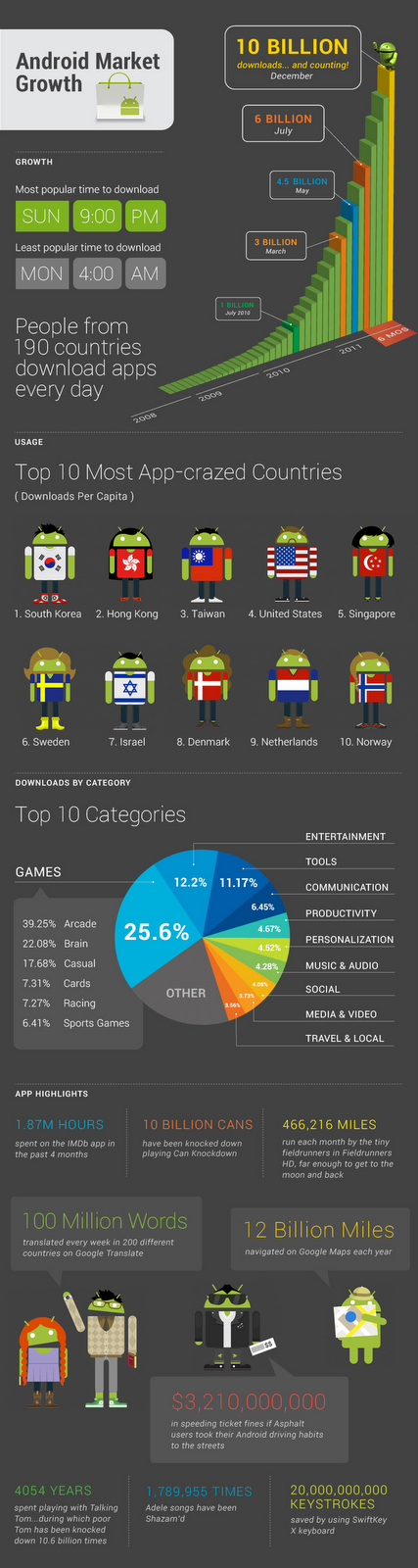
On Tuesday, we announced that Android Market passed 10 Billion app downloads. We wanted to look a little deeper at that huge number. First question: which app was lucky number 10 billion? Photobucket Mobile. They’ll be getting a great prize package, including tickets to next year’s Google I/O developer conference.


Remember we still have 8 days left to celebrate 10 billion downloads with 10-cent apps on Android Market. You can follow which apps are promoted each day on +Android, our Google+ page.


Here’s a graphical deep dive into 10 billion downloads...


10 Billion Android Market downloads and counting

(Cross-posted on the Official Google Blog and Android Developer's Blog)


One billion is a pretty big number by any measurement. However, when it’s describing the speed at which something is growing, it’s simply amazing. This past weekend, thanks to Android users around the world, Android Market exceeded 10 billion app downloads—with a growth rate of one billion app downloads per month. We can’t wait to see where this accelerating growth takes us in 2012.


To celebrate this milestone, we partnered with some of the Android developers who contributed to this milestone to make a bunch of great Android apps available at an amazing price. Starting today for the next 10 days, we’ll have a new set of awesome apps available each day for only 10 cents each. Today, we are starting with Asphalt 6 HD, Color & Draw for Kids, Endomondo Sports Tracker Pro, Fieldrunners HD, Great Little War Game, Minecraft, Paper Camera, Sketchbook Mobile, Soundhound Infinity & Swiftkey X.

Of course, none of these apps would have existed if it weren’t for the developers who created them. Every day, these developers continue to push the limits on what’s possible and delight us in the process. For that, we thank them.

Please join us in this 10-day celebration and check in every day to see what new apps our developer partners are making available on Android Market - for only a dime.

Games Coming to Android Market in Korea


[This post is by Eric Chu, Android Developer Ecosystem. —Dirk Dougherty]


In the 24 months since the first Android device became available locally, Korea has quickly become one of the top countries in Android device activations. In parallel, we’ve also seen tremendous growth in app downloads from Android Market. Korea is now the second-largest consumer of apps worldwide. Today we are adding to this momentum by bringing games to Android Market in Korea.


Starting right away, Android users in Korea can explore the many thousands of popular game titles available in Android Market and download them onto their devices. For paid games, purchasing is fast and convenient through direct carrier billing, which lets users in Korea easily charge their purchases to their monthly mobile operator bills.


If you are a game developer, now is the time to localize your game resources, app descriptions, and marketing assets to take advantage of this new opportunity. When you are ready, please visit the Android Market developer console to target your app for distribution in South Korea and set prices in Korean Won (KRW). If you don’t want to distribute to Korea right away, you can also exclude it.


With the huge popularity of games on Android and the convenience of direct carrier billing in Korea, we expect to see a jump in game purchases and downloads in the weeks ahead. For game developers worldwide, it’s “game on” in Korea!

More Carrier Billing Options on Android Market


[This post is by Eric Chu, Android Developer Ecosystem. —Dirk Dougherty]


Over the past year, we’ve seen very strong growth in the number of Android users around the world. To make it easier for those users to purchase their favorite apps and games on Android Market, we’re bringing Direct Carrier Billing to additional carrier networks in South Korea, the UK, and Germany.


In South Korea, we’ve begun a phased rollout of the service to users on the top two carrier networks — SK Telecom and KT Corporation. When complete, the rollout will reach more than 10 million users, who will be able to charge their Android Market purchases straight to their phone bills.


In Europe, we’re rolling out the service to users on two popular regional carriers, Vodafone UK and Vodafone DE. Initially, the service will be available only to users who have purchased their devices through Vodafone’s online and retail channels.


The new launches expand the network of carriers already offering direct billing service in the US on the T-Mobile, AT&T, and Sprint networks, and in Japan on SoftBank, KDDI, and NTT DOCOMO networks.


Direct Carrier Billing is a key payment option for users worldwide, especially in regions where credit cards are less common. We will continue to partner with more operators to offer this payment option to their Android users. Watch for more announcements in the weeks ahead.

Multiple APK Support in Android Market

[This post is by Eric Chu, Android Developer Ecosystem. —Dirk Dougherty]

At Google I/O we announced our plans to add several new capabilities to help developers manage their products more effectively in Android Market. We’re pleased to let you know that the latest of those, multiple APK support, is now available. Multiple APK support is a new publishing option in Android Market for those developers who want extra control over distribution.

Until now, each product listing on Android Market has included a single APK file, a universal payload that is deliverable to all eligible devices — across all platform versions, screen sizes, and chipsets. Broad distribution of a single APK works very well for almost all applications and has the advantage of simplified product maintenance.

With multiple APK support, you can now upload multiple versions of an APK for a single product listing, with each one addressing a different subset of your customers. These APKs are complete, independent APKs that share the same package name, but contain code and resources to target different Android platform versions, screen sizes, or GL texture-compression formats. When users download or purchase your app, Android Market chooses the right APK to deliver based on the characteristics of the device.

When you upload multiple APK files, Android Market handles them as part of a single product listing that aggregates the app details, ratings, and comments across the APKs. All users who browse your app’s details page see the same product with the same description, branding assets, screenshots, video, ratings, and comments. Android Market also aggregates the app’s download statistics, reviews, and billing data across all of the APKs.

Multiple APK support gives you a variety of ways to control app distribution. For example, you could use it to create separate APKs for phones and tablets under the same product listing. You could also use it to take advantage of new APIs or new hardware capabilities without impacting your existing customer base.

To support this new capability, we’ve updated the Developer Console to include controls for uploading and managing APKs in a product listing — we encourage you to take a look. If you’d like to learn more about how multiple APK support works, please read the developer documentation. As always, please feel free to give us feedback on the feature through the Market Help Center.

A New Android Market for Phones

[This post is by Eric Chu, Android Developer Ecosystem. —Dirk Dougherty]

Earlier this year, we launched several important features aimed at making it easier to find great applications on Android Market on the Web. Today, we're very excited to launch a completely redesigned Android Market client that brings these and other features to phones.

The new Market client is designed to better showcase top apps and games, engage users with an improved UI, and provide a quicker path to downloading or purchasing your products. For developers, the new Android Market client means more opportunities for your products to be merchandised and purchased.

In the home screen, we've created a new promotional page that highlights top content. This page is tiled with colorful graphics that provide instant access to featured apps and games. The page also lets users find their favorite books and movies, which will help drive even more return visits to Market.

To make it fun and easy for users to explore fresh content, we've added our app lists right to the Apps and Games home pages. Users can now quickly flip through these lists by swiping right or left, checking out what other people are downloading in the Top Paid, Top Free, Top Grossing, Top New Paid, Top New Free, and Trending lists. To keep the lists fresh and relevant, we've made them country-specific for many of the top countries.


To help you convert visitors to customers, we’ve made significant changes to the app details page. We've moved the app name and price into a compact action bar at the top of the page, so that users can quickly download or purchase your app. Directly below, users can flip through screen shots by swiping right or left, or scroll down to read your app's description, what's new, reviews, and more. To help you promote your product more effectively, the page now also includes a thumbnail link to your product video which is displayed at full screen when in landscape orientation.

For users who are ready to buy, we've streamlined the click-to-purchase flow so that users can complete a purchase in two clicks from the app details page. During the purchase, users can also see a list of your other apps, to help you cross-sell your other products.

With a great new UI, easy access to app discovery lists, a convenient purchase flow, and more types of content, we believe that the new Market client will become a favorite for users and developers alike.

Watch for the new Market client coming to your phone soon. We've already begun a phased roll-out to phones running Android 2.2 or higher — the update should reach all users worldwide in the coming weeks. We encourage you to try the update as soon as you receive it. Meanwhile, check out the video below for an early look.

A new Android Market for phones, with books and movies

Recently, we’ve been hard at work improving Android Market to give you new ways to find great applications and games, purchase books, and rent movies. Today, we’re releasing a new version of Android Market which makes all of these available on phones (Android 2.2 and higher).


In the U.S., you’ll be able to rent thousands of movies, starting at $1.99, right from Android Market on your phone. With the Videos app, available in Android Market, there’s no more waiting for downloads, syncing, or worrying about storage space. Simply sign into Android Market with your Google account, and you can rent movies from anywhere – the web, or your Android phone or tablet – and start watching instantly. You can also download movies to your device so they’re available for viewing when you don’t have an internet connection.

Also in the U.S., you can now purchase books from Android Market on your phone. Like movie rentals, books are linked to your Google account, so they’re instantly available across all of your devices – computer, phone, or tablet – without the need for wires or downloads.

You’ll be delighted to find we’ve overhauled Android Market to make it faster, easier, and more fun to discover great apps, movies, and books. We’ve created more space to feature some of the most interesting content of the week on the home page. We’ve added more top charts, with newer, more relevant items, and we’ve made it easy to swipe through these charts as you browse the store. We’ve also introduced new collections of great content, like staff picks and Editors’ Choice apps.


The new Android Market will be rolling out in the coming weeks to Android 2.2 and higher phones around the world. You don’t need to do anything - the update is automatic on supported phones. If you’re in the U.S., you’ll also be able to download the Videos app, rent movies, and buy books once you receive the new Android Market.

Your phone is about to get a lot more interesting! Enjoy the new Android Market.

Finding great deals is easier with Google Shopper 2.0

Today we’re announcing a new set of features in Google Shopper for Android to make it even easier to research products and find great value deals when you’re on-the-go.

First, we’ve moved features around a bit to help you perform common tasks more quickly. For example, the ‘Starred’ and ‘History’ buttons are now at the top of the page. We’ve also added new tabs to the bottom of the screen for fast navigation to Google Shopper’s newest features.

With Google Shopper, you can now find, save and redeem offers at nearby businesses through three tabs:
  • Today’s Offer: part of the Google Offers beta program, this tab displays a single offer for discounted goods or services in your area. Today's Offer is currently available in Portland, Oregon, the San Francisco Bay Area and New York, with other cities to follow.
  • Nearby Offers: when you click this tab, you'll see offers in the 'Eat' and 'Play' categories which nearby businesses have submitted through Google Places.
  • My Offers: for those of us who occasionally misplace coupons or gloss over expiration dates, Google Shopper makes it easy to stay organized. When you come across an offer you like you can save it for later. Your saved and purchased offers appear on this tab and you can see which offers are close to expiring. To take advantage of an offer, just navigate to ‘My Offers,’ select the one you’d like, and click ‘Redeem’. In the future you’ll also be able to access and redeem your saved offers using Google Wallet.

Tap on Today’s Offer, Nearby Offers or My Offers to see great deals.


Visit Android Market to download Google Shopper 2.0, currently available for Android 2.1 and higher devices in the US and UK. If you already have the app installed you’ll automatically receive a notification to update it.

Things That Cannot Change

[This post is by Dianne Hackborn, whose fingerprints can be found all over the Android Application Framework — Tim Bray]

Sometimes a developer will make a change to an application that has surprising results when installed as an update to a previous version — shortcuts break, widgets disappear, or it can’t even be installed at all. There are certain parts of an application that are immutable once you publish it, and you can avoid surprises by understanding them.

Your package name and certificate

The most obvious and visible of these is the “manifest package name,” the unique name you give to your application in its AndroidManifest.xml. The name uses a Java-language-style naming convention, with Internet domain ownership helping to avoid name collisions. For example, since Google owns the domain “google.com”, the manifest package names of all of our applications should start with “com.google.” It’s important for developers to follow this convention in order to avoid conflicts with other developers.

Once you publish your application under its manifest package name, this is the unique identity of the application forever more. Switching to a different name results in an entirely new application, one that can’t be installed as an update to the existing application.

Just as important as the manifest package name is the certificate that application is signed with. The signing certificate represents the author of the application. If you change the certificate an application is signed with, it is now a different application because it comes from a different author. This different application can’t be uploaded to Market as an update to the original application, nor can it be installed onto a device as an update.

The exact behavior the user sees when installing an application that has changed in one of these two ways is different:

  • If the manifest package name has changed, the new application will be installed alongside the old application, so they both co-exist on the user’s device at the same time.

  • If the signing certificate changes, trying to install the new application on to the device will fail until the old version is uninstalled.

If you change the signing certificate of your application, you should always change its manifest package name as well to avoid failures when it’s installed. In other words, the application coming from a different author makes it a different application, and its package name should be changed appropriately to reflect that. (Of course it’s fine to use the same package name for the development builds of your app signed with your test keys, because these are not published.)

Your AndroidManifest.xml is a public API

More than just your package name that is immutable. A major function of the AndroidManifest.xml is essentially to declare a public API from your application for use by other applications and the Android system. Every component you declare in the manifest that is not private (that is whose android:exported state is true) should be treated as a public API and never changed in a way that breaks compatibility.

A subtle but important aspect of what constitutes a break in compatibility is the android:name attribute of your activity, service, and receiver components. This can be surprising because we think of android:name as pointing to the private code implementing our application, but it is also (in combination with the manifest package name) the official unique public name for that component, as represented by the ComponentName class.

Changing the component name inside of an application can have negative consequences for your users. Some examples are:

  • If the name of a main activity of your application is changed, any shortcuts the user made to it will no longer work. A shortcut is an Intent that directly specifies the ComponentName it should run.

  • If the name of a service implementing a Live Wallpaper changes, then a user who has enabled your Live Wallpaper will have their wallpaper revert to the system default when getting the new version of your app. The same is true for Input Methods, Accessibility Services, Honeycomb’s new advanced Widgets, and so on.

  • If the name of a receiver implementing a Device Admin changes, then as with the live wallpaper example, the device admin will be disabled when the application is updated. This also applies to other kinds of receivers, such as App Widgets.

These behaviors are an outcome of how the Intent system is used on Android. There are two main kinds of Intents:

  • Implicit Intents only specify “what” they should match, using actions, categories, data, MIME types, and so on. The exact components that they will find are only determined at run-time, by the Package Manager matching it against the current applications.

  • Explicit Intents specify a single explicit “who” they should match, through a ComponentName. Regardless of whatever else is in the Intent, it is only associated with the exact manifest package name and class name as given in its ComponentName.

Both of these types of Intents are important to how Android interacts with your application. A typical example of this is how users browse and select live wallpapers.

To let the user pick a live wallpaper, the first thing Android must do is show them a list of the available live wallpaper services. It does this by building an implicit Intent with the appropriate action for a live wallpaper and asking the Package Manager for all services that support this Intent. The result is then the list of live wallpapers shown to the user.

When the user actually selects a specific live wallpaper they want to use, however, Android now must build an explicit Intent that identifies that particular live wallpaper. This is what is handed to the WallpaperManager to tell it which wallpaper to show.

This is why changing the name of the component in your manifest will cause the wallpaper to disappear: the explicit Intent that was previously saved is now invalid because the ComponentName it references no longer exists. There is no information available to indicate what the new name of the component is. (For example consider if your application had two different live wallpaper services the user could select.) Instead, Android must treat that live wallpaper as uninstalled and revert to its default wallpaper.

This is how input methods, device administrators, account managers, app widgets, and even application shortcuts work. The ComponentName is the public unique name of the components you declare in your manifest, and must not change if they are visible to other applications.

In conclusion: There are some parts of your application that can not change. Please be careful.

New ways to discover great apps on Android Market

We’ve seen tremendous growth in Android Market lately. With over 200,000 apps supporting over 300 Android devices, we’ve had 4.5 billion applications installed to date. But with so many apps available, how do you find the ones you really want? Whether you’re looking for the most popular apps, hot new apps, or just the very best apps available, we want to help make sure that you find what you’re looking for.

Today, we’re excited to announce 5 new features for Android Market focused on helping you find apps you’ll love.


  • New top app charts - We’ve revamped our top app charts to be fresher and country-specific, so you get the most current, relevant results. We’ve also added top new free, top new paid, and top grossing lists, all right on the Android Market home page.   
  • Editors’ Choice - These are some of the very best apps available for Android, as chosen by the Android Market staff. They span everything from games to productivity and beyond.   
  • Top Developers - We’re also recognizing those developers creating the highest quality, most popular, and most notable apps available on Android Market. They’ll get a special icon on our Android Market website, appearing wherever the developer name is shown, starting today for an initial set of over 150 developers.
  • Better related apps - On the left side of an app page, you’ll now see two groups of related apps: apps frequently browsed by people who viewed this app, and apps that people tend to install alongside this app. For example, people who view ScoreMobile, my favorite sports score app, often also view other sports score apps, while those who install ScoreMobile tend to also install apps for specific sports leagues or teams. We’ll also show you related apps once you decide to install an app.
  • Trending apps - Finally, we’ve added a new section to the Android Market homepage showing trending apps – those apps that are quickly growing in daily installs. Look here to stay ahead of the curve and find new apps as they get hot.
We hope you find these features helpful as you explore the many greats apps available on Android Market. These new features are available now on http://market.android.com, and will be coming soon to Android Market on phones and tablets.


Posted by Fernando Delgado, Product Manager, Android Market

Merchant Sales Reports on Android Market

[This post is by Eric Chu, Android Developer Ecosystem. —Dirk Dougherty]

As part of our ongoing efforts to provide better tools to help you manage your business, we are introducing merchant sales reporting on Android Market. Developers now have convenient access to monthly reports that detail the financial performance of their applications directly from the Android Market Developer Console.

Based on Google Checkout financial data, these reports provide per-transaction details including additional information such as device information, currency of sale, and currency conversion rate. Developers will be able to easily download these reports as a CSV (comma-separated values) files to enable further analysis at their convenience.

Starting today, developers can download merchant sales reports for March 2011 from the Developer Console. Reports for months going back to January 2010 will be available in the coming weeks. Moving forward, sales reports for each month will be available by the 10th day of the following month.

We hope you’ll find these new sales reports useful. As always, please don’t hesitate to give us feedback through Market Help Center.

New Carrier Billing Options on Android Market


[This post is by Eric Chu, Android Developer Ecosystem. —Dirk Dougherty]

Since last year, we’ve been working to bring the convenience of Direct Carrier Billing to more Android Market users on more carrier networks. Building on the launches to T-Mobile US and AT&T users in 2010, we’ve recently launched Direct Carrier Billing to users on three popular networks in Japan -- SoftBank, KDDI, and NTT DOCOMO.

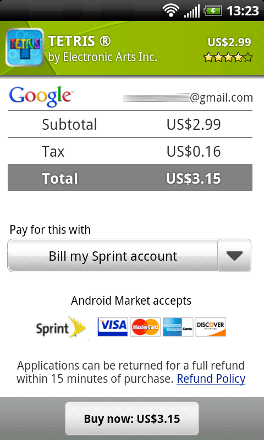
The momentum continues and today we’re excited to announce that Direct Carrier Billing is now available on Sprint. We've begun a phased roll-out of the service that will reach all users in the next few days. When complete, Android users on the Sprint network will be able to charge their Android Market purchases to their Sprint mobile bill with only a few clicks.

We believe that Direct Carrier Billing is a key payment option because it lets users purchase and pay for apps more easily. It’s also important because it offers a convenient way to buy in regions where credit cards are less common.

We are continuing to partner with more carriers around the world to offer carrier billing options to their subscribers. Watch for announcements of new payment options coming in the months ahead.

In-app Billing Launched on Android Market

[This post is by Eric Chu, Android Developer Ecosystem. —Dirk Dougherty]

Today, we're pleased to announce the launch of Android Market In-app Billing to developers and users. As an Android developer, you will now be able to publish apps that use In-app Billing and your users can make purchases from within your apps.

In-app Billing gives you more ways to monetize your apps with try-and-buy, virtual goods, upgrades, and other billing models. If you aren’t yet familiar with In-app Billing, we encourage you to learn more about it.

Several apps launching today are already using the service, including Tap Tap Revenge by Disney Mobile; Comics by ComiXology; Gun Bros, Deer Hunter Challenge HD, and WSOP3 by Glu Mobile; and Dungeon Defenders: FW Deluxe by Trendy Entertainment.

To try In-app Billing in your apps, start with the detailed documentation and complete sample app provided, which show how to implement the service in your app, set up in-app product lists in Android Market, and test your implementation. Also, it’s absolutely essential that you review the security guidelines to make sure your billing implementation is secure.

We look forward to seeing how you’ll use this new service in your apps!

Application Stats on Android Market

[This post is by Eric Chu, Android Developer Ecosystem. —Dirk Dougherty]

On the Android Market team, it’s been our goal to bring you improved ways of seeing and understanding the installation performance of your published applications. We know that this information is critical in helping you tune your development and marketing efforts. Today I’m pleased to let you know about an important new feature that we’ve added to Android Market called Application Statistics.

Application Statistics is a new type of dashboard in the Market Developer Console that gives you an overview of the installation performance of your apps. It provides charts and tables that summarize each app’s active installation trend over time, as well as its distribution across key dimensions such as Android platform versions, devices, user countries, and user languages. For additional context, the dashboard also shows the comparable aggregate distribution for all app installs from Android Market (numbering in the billions). You could use this data to observe how your app performs relative to the rest of Market or decide what to develop next.


To start with, we’ve seeded the application Statistics dashboards with data going back to December 22, 2010. Going forward, we’ll be updating the data daily.

We encourage you to check out these new dashboards and we hope they’ll give you new and useful insights into your apps’ installation performance. You can access the Statistics dashboards from the main Listings page in the Developer Console.

Watch for more announcements soon. We are continuing to work hard to deliver more reporting features to help you manage your products successfully on Android Market.

Updates to the Google Reader app for Android

(Cross-posted from the Google Reader blog)

Today we’re excited to announce some updates to the official Google Reader app for Android. Over the last couple of months, we’ve added some of your most-requested features:

Unread count widget - choose any feed, label, person, or “all items” and get the unread count on your home screen. Clicking on the widget takes you to straight to that stream.

  • News ticker widget - if you prefer a bit more information, you can add a larger size widget that cycles through items on any stream you want in Reader. Clicking any headline will take you to the article, while clicking the folder will take you to that stream.


  • That is a lot of widgets

  • Mark previous as read - if you’ve used the mobile version of Reader before and missed this feature, it’s now back! As you scroll down your reading list, hit “Mark previous as read” at any time to only mark things above the screen as read.


  • In addition to these new features, we now have an official Russian translation as well.

    We hope you enjoy the update - give it a try! You can download the app in all countries from Android Market. The Google Reader app is available for devices running Android 1.6 or higher, with widget functionality available for devices on Android 2.2+. 

    Posted by Brian Shih, Product Manager

    New Merchandising and Billing Features on Android Market

    [This post is by Eric Chu, Android Developer Ecosystem. —Dirk Dougherty]


    Following on last week’s announcement of the Android 3.0 Preview SDK, I’d like to share some more good news with you about three important new features on Android Market.

    Android Market on the Web


    Starting today, we have extended Android Market client from mobile devices to every desktop. Anyone can now easily find and share applications from their favorite browser. Once users select an application they want, it will automatically be downloaded to their Android-powered devices over-the-air.

    Android Market on the Web dramatically expands the discoverability of applications through a rich browsing experience, suggestion-guided searching, deep linking, social sharing, and other merchandising features.

    We are releasing the initial version of Android Market on the Web in English and will be extending it to other languages in the weeks ahead.

    If you have applications published on Android Market, we encourage you to visit the site and review how they are presented. If you need additional information about what assets you should provide, please visit Android Market Help Center.

    You can access Android Market on the Web at:

    http://market.android.com/

    Buyer’s Currency

    Android Market lets you sell applications to users in 32 buyer countries around the world. Today we’re introducing Buyer’s Currency to give you more control over how you price your products across those countries. This feature lets you price your applications differently in each market and improves the purchase experience for buyers by showing prices in their home currencies.

    We’ll be rolling out Buyer’s Currency in stages, starting with developers in the U.S. and reaching developers in other countries shortly after. We anticipate it will take approximately four months for us to complete this process.

    We encourage you to watch for the appearance of new Buyer’s Currency options in the Android Market publishing console and set prices as soon as possible.

    In-app Billing

    After months of hard work by the Android Market team, I am extremely pleased to announce the arrival of In-app Billing on Android Market. This new service gives developers more ways to monetize their applications through new billing models including try-and-buy, virtual goods, upgrades, and more.

    The In-app Billing service manages billing transactions between apps and users, providing a consistent purchasing experience with familiar forms of payment across all apps. At the same time, it gives you full control over how your digital goods are purchased and tracked. You can let Android Market manage and track the purchases for you or you can integrate with your own back-end service to verify and track purchases in the way that's best for your app.

    We’ll be launching In-app Billing in stages. Beginning today, we are providing detailed documentation and a sample application to help you get familiar with the service. Over the next few weeks we’ll be rolling out updates to the Android Market client that will enable you to test against the In-app Billing service. Before the end of this quarter, the service will be live for users, to enable you to start monetizing your applications with this new capability. For complete information about the rollout, see the release information in the In-app Billing documentation.

    Helping developers merchandise and monetize their products is a top priority for the Android Market team. We will continue to work hard to to make it the best marketplace for your to distribute your products. For now, we hope you’ll check out these new features to help you better deliver your products through Android Market.

    Introducing the Android Market website

    Over the past two years, developers around the world have helped make Android Market the go-to place for more than 100,000 apps, games and widgets. Previously, you could only access Android Market directly from your device, but today, we are introducing the Android Market website that lets you browse and search for great apps right from your web browser.


    The website makes it easy to discover great new apps with a bigger, brighter interface. You can also send apps directly to your Android device with just a few clicks—no wires needed. We’ve built in new social features, too. You can share apps with your friends through Twitter. And you can read and post app reviews directly to Android Market from the web or from your device.

    And what about all those apps you’ve already purchased and downloaded? Sign in to the website with your Google account and click “My Market Account” to see all the apps you’ve purchased or downloaded. It makes managing all your apps quite easy.

    The Android Market website was officially unveiled today during an event at Google headquarters where we showcased Honeycomb (Android 3.0), our latest Android release built from the ground up for tablets. Honeycomb has a completely redesigned user interface, with more interactive notifications and widgets, improved multi-tasking, and the latest and greatest Google Mobile services optimized for tablets. We also showed off pre-release applications optimized for Honeycomb, from over 17 developers including:

    • AccuWeather
    • CNN
    • Disney Mobile
    • The Economist
    • Fuze box
    • Glu Mobile
    • Google Body
    • Grocery iQ
    • Intuit
    • Ngmoco
    • Pulse News
    • Quickoffice
    • Time Magazine
    • TouchType
    • Trendy Entertainment
    • War Drum Studios
    • Weatherbug
    • Zynga

    Stay tuned for more at Mobile World Congress (February 14) in Barcelona where you'll see more than 50 developers demoing their latest phone and tablet apps at the Android booth in Hall 8.


    Android 2.2 and developers goodies.

    Today at Google I/O we announced that Android 2.2 is right around the corner. This is our seventh platform release since we launched Android 1.0 in September 2008. We wanted to highlight five areas in particular:

    Performance & speed: The new Dalvik JIT compiler in Android 2.2 delivers between a 2-5X performance improvement in CPU-bound code vs. Android 2.1 according to various benchmarks.

    New enterprise capabilities: We’ve added Exchange capabilities such as account auto-discovery and calendar sync. Device policy management APIs allow developers to write applications that can control security features of the device such as the remote wipe, minimum password, lockscreen timeout etc.

    Faster, more powerful browser: We have brought the V8 JavaScript engine to the Android browser as part of 2.2. This has resulted in a 2-3X improvement in JavaScript performance vs. 2.1.

    Rich set of new APIs and services: New data backup APIs enable apps to participate in data backup and restore, allowing an application's last data to be restored when installed on a new or a reset device. Apps can utilize Android Cloud to Device Messaging to enable mobile alert, send to phone, and two-way push sync functionality. Developers can now declare whether their app should be installed on internal memory or an SD card. They can also let the system automatically determine the install location. On the native side, a new API now gives access to Skia bitmaps.

    Additions to Android Market: Android Market provides Android Application Error Reports, a new bug reporting feature, giving developers access to crash and freeze reports from users. Developers will be able to access these reports via their account on the Android Market publisher website.

    For a complete list of everything we’ve included in Android 2.2, please see the platform highlights.

    Developers can now download the Android 2.2 SDK and Android NDK, Revision 4 from the Android developer site.

    Tools update

    We are releasing new version of the Android SDK Tools, Revision 6, Eclipse plug-in ADT 0.9.7 and Android NDK, Revision 4.

    Android SDK Tools, Revision 6, Eclipse plug-in 0.9.7

    These new versions include support for library projects that will help you share code and resources across several Android projects.

    Android NDK, Revision 4

    Workflow improvements
    The new NDK brings a host of workflow improvement, from compilation, to debugging. Starting with 2.2, the NDK enables debugging native code on production devices.

    ARMv7 instruction set support
    This release enables the generation of machine code for the ARMv7-A instruction set. Benefits include higher performance, as well as full use of the hardware FPU for devices that support it.

    ARM Advanced SIMD (a.k.a. NEON) instruction support
    The NEON instruction set extension can be used to perform scalar computations on integers and floating points. However, it is an optional CPU feature and will not be supported by all Android ARMv7-A based devices. The NDK includes a tiny library named "cpufeatures" that can be used by native code to test at runtime the features supported by the device's target CPU.

    For more information, please see the releases notes for the SDK Tools, ADT, and NDK.

    As I said at the beginning, Android 2.2 will be here soon, and some devices will get the update in the coming weeks. I invite application developers to download the new SDK and tools and test your applications today.

    Check out the video below to learn more about Android 2.2.