Showing posts with label Google Play. Show all posts

In-app Subscriptions in Google Play


[This post is by Ibrahim Elbouchikhi, Product Manager on the Google Play team. —Dirk Dougherty]


We launched In-app Billing on Google Play a year ago to give developers more ways to sell and engage users over the lifetime of their apps. Since the launch, In-app Billing has been extremely successful in helping developers monetize their apps through try-and-buy, virtual goods, upgrades, and other popular business models. Today, 23 of the 24 top-grossing apps in Google Play use In-app Billing, and the total revenue generated from in-app purchases exceeds revenue from traditional app purchases.


We’re now taking In-app Billing further by adding another important business model — subscriptions. Starting today, developers can use In-app Billing to sell monthly or annual subscriptions from inside of their apps. All subscriptions are auto-renewing, for every app and game and every type of subscription product. Developers just set the price and billing interval and Google Play manages the purchase transactions for them, just as it does for other in-app products and app purchases.


For users, Google Play provides a familiar and convenient purchase experience, highlighting subscription details such as price and billing interval before continuing with purchases. After the transaction, Google Play manages recurring billing and keeps users informed of new charges, sending them an email with each renewal. At any time, users can visit My Apps in the Play Store app to view their subscriptions and cancel any subscription as needed.


While making it easy for developers to offer a great purchasing experience, our subscriptions are also designed for flexibility. Developers can use them to monetize premium dynamic content such as journals and magazines, but they can also use them to sell access to bundled products, game levels, music and video content, value-added services, or any other digital content.


Building on Google Play’s strength as a truly cloud-connected experience, developers can offer users the ability to carry their subscriptions across multiple properties, services, or campaigns. To make this easier, we’re introducing an HTTP-based publisher API through which enterprise-scale backend servers can validate or cancel subscriptions. Using this API, for example, developers can extend access from their Android apps to their web properties, based on subscriptions that are purchased on Google Play.


In the coming days, several developers will be launching apps with Google Play subscriptions and we expect many more to follow. Glu Mobile is launching updated versions of its top Android titles, including Frontline Commando, offering subscriptions through custom VIP currency packages. "We're using Google Play subscriptions to offer consumers a compelling value and a single currency which they can use across Glu’s most popular titles” says Niccolo de Masi, CEO of Glu. “We're excited to bring these capabilities to our Android users and we believe that Google Play subscriptions will fuel further growth in our business."


If you’re a developer, you can get started with subscriptions right away by reading the In-app Billing documentation and downloading the updated sample app. If you are already using in-app billing, you’ll find that adding support for subscriptions is straightforward and involves only minor changes to your code.


You can publish your updated apps and subscription products as soon as you are ready. We’ve already rolled out client support to most Android devices worldwide, so any user with Google Play 3.5 or higher installed can buy subscriptions starting today.


We’re looking forward to seeing how you use subscriptions in your apps!


Join the discussion on

+Android Developers


New Seller Countries in Google Play

Over the past year we’ve been working to expand the list of countries and currencies from which Android developers can sell their products. Starting today, developers in Czech Republic, Israel, Poland, and Mexico can sell priced applications and in-app products on Google Play, using their local bank accounts for payments. Welcome developers!


If you develop Android apps in one of the new countries and want to get started selling them, visit play.google.com/apps/publish and set up a new Google Play developer account. Once you’ve uploaded your apps, you can price them in any available buyer currencies, publish, and then receive payouts and financial data in your local currency.


If you are based in Israel or Mexico and are currently selling apps through an AdSense merchant account, you will need to migrate your apps to a new Google Play developer account in your local currency. Watch for an email that provides complete information on the migration process and timeline.


Additionally, we encourage developers everywhere to visit the Developer Console as soon as possible to set prices for their products in the currencies of these new countries. Stay tuned for more announcements soon as we continue to roll out our new billing infrastructure to buyers and sellers throughout the world.


Join the discussion on

+Android Developers


New Sales Reports on Google Play


[This post is by Debashish Chatterjee, Krishna Atkuru, and Ellie Powers of the Google Play Publisher Site team. —Dirk Dougherty]


For app publishers, complete and timely sales reporting is incredibly useful for managing a business on Google Play. Today we are introducing a new financial tool — Estimated Sales Reports — to give you visibility over ongoing product sales and help you support customers between payout cycles.


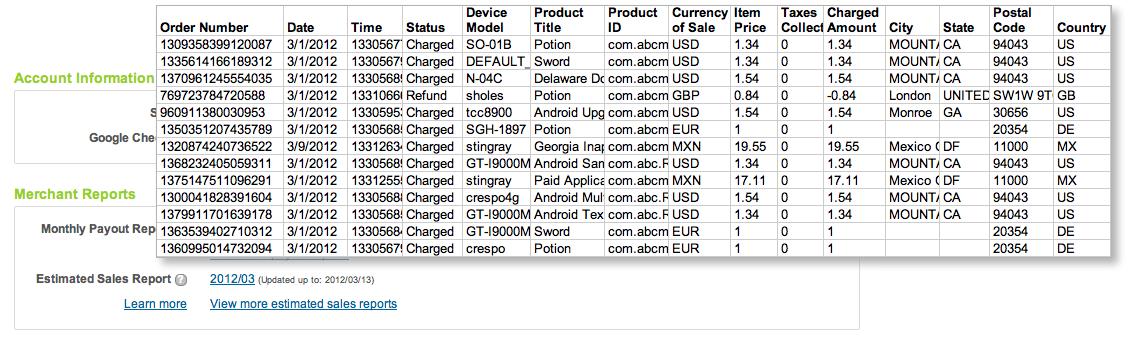
The new sales reports show you complete transaction details of recent sales and refunds for all products in your developer account, including both in-app products and paid apps. Each report is a cumulative for the current payout period, updated nightly with the details of recent transactions. As customers complete purchases and their accounts are charged (or refunds are applied), the new transaction details are appended to the Estimated Sales Report. Depending on account timezone differences, transactions appear on the estimated sales report within 2 days of completion. Finally, at the close of the monthly payout cycle, the current Estimated Sales Report is archived and a new report is created for the next cycle.


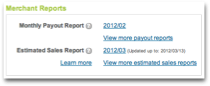
You can access current or past sales reports from the “Merchant Reports” section of the Developer Console. The Estimated Sales Reports are downloadable CSV (comma-separated values) files, so you can analyze the data using any tools you choose, in the same way as you've been doing for payout reports. The sales reports list the same details as payout reports — buyer and order, product, device information, amount, currency of sale, and more — except without final payment details. This makes it easier for you to reconcile recorded sales against your actual payouts. Estimated sales reports are available with data starting February 1, 2012.


We’ve also taken this opportunity to rename our existing “Merchant Sales Reports” to Monthly Payout Reports, to better reflect their content.


Together with the application statistics introduced last month, the Estimated Sales and Monthly Payout Reports give you a more complete view of your products’ download and sales activity over time. We hope you’ll find them useful. As always, please feel free to give us feedback through the Developer Help Center.


Join the discussion on

+Android Developers


Introducing Google Play


[This post is by Kenneth Lui, Android Developer Ecosystem. —Dirk Dougherty]

For more than a year we’ve been focused on expanding the reach, content, and monetization opportunities of Android Market. We started by extending the store to users on the web and then went on to add books, movies, and music. The number of people who have visited, registered, and downloaded from the store has been amazing.


Today we’re launching Google Play, an integrated destination for apps, books, movies, and music, accessible to users on Android devices and to anyone on the Web. As part of this launch, Google Play replaces and extends Android Market — users everywhere can now find their favorite apps and games in Google Play, with other digital content, all in one place.


We believe that with a strong brand, compelling offerings, and a seamless purchasing and consumption experience, Google Play will drive more traffic and revenue to the entire ecosystem.


We’ll be investing in the brand to bring Google Play to as many people as possible, and we’ll also invest in the latest digital content to keep Google Play fresh, relevant, and engaging. Apps and games remain the core of Google Play, so we’ll continue investing in new ways to connect users with their favorite apps, and developers with new customers.


As we grow and promote Google Play around the world, we’ll be marketing your apps and games at the same time. Our policies have not changed and our goal is still the same — to create a great, open marketplace for distributing Android apps.


Google Play is built on the same infrastructure as Android Market, so the transition for users and developers will be seamless. Users can sign into their existing accounts with the same credentials as before and purchase content using the same payment methods. As a developer, there’s no change needed to your published products and you can continue to use the same publishing tools to put your app in front of hundreds of millions of Android users. If your app was in Android Market yesterday, it’s in Google Play today.


We’ll be rolling out Google Play to devices in a phased OTA update, starting today and continuing over the days to come. With the update, the Android Market app will upgrade to the Play Store app and the Music, Videos, and Books apps will upgrade to Play Music, Play Movies, and Play Books. This update is for devices running Android 2.2 or higher, and users on other devices will continue to have the same access to your apps as before.


You can start sending customers to your products in Google Play right away. Check out the updated “Get it on Google Play” badges and look for an email with more details on the transition. In the meantime, you can check out the Google Play web site at the link below and join the discussion on +Android Developers.


http://play.google.com